
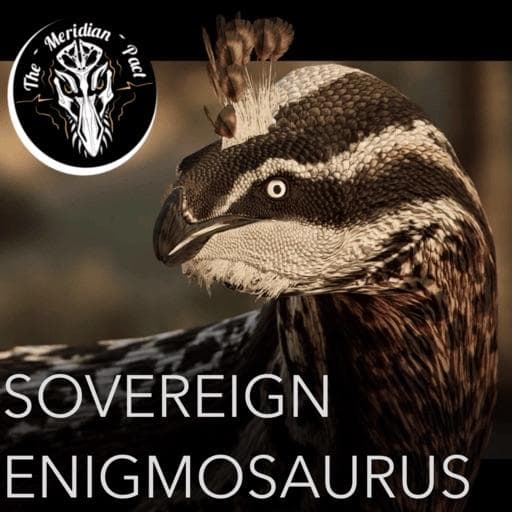
Meridian Mods: Sovereign Enigmosaurus
by SovereignZenith(586-000-361)
Description
The Meridian Pact presents Enigmosaurus! Our premiere mod of the large therizinosaurid with highly speculative feathering resembling that of a peacock! This bleed heavy creature boasts surprising agility to chase down it's foes and flaunt your victories with your massive magnificent tail!
Massive thank you to:
Coding: Feilong
Model: Flow
Subspecies: Janey
Sounds: CerealKiller, M_Z, Inkylon
Ability Icons: Janey, ElReptileano, SnowyHearty, Ink.Well,
Skins/Textures: Pi, SnowyHearty, Janey, Mars, Ponti, Fledged Feathers, Mansery, DinosaurLoverForev, Beadil, Vividsky
Credit to Cito for the mod page icon!
How to install on a Path of Titans community server
Three steps. Stop the server first - mod changes only apply on startup.
- 1
Find the Mod ID
In Path of Titans, open the Mods page, select the mod, and copy the Mod ID (it looks like
UGC_M_...).For this mod:
UGC_M_YNRE3MX781_SK(use the Copy button on the right). - 2
Edit your server files
- Log in to your server panel and STOP the server.
- Navigate to the config directory, usually:
/PathOfTitans/Saved/Config/LinuxServer - Open
GameUserSettings.iniand find or create the header:
[PathOfTitans.Mods]
EnabledMods=UGC_M_YNRE3MX781_SK
#Meridian Mods: Sovereign Enigmosaurus
Add a new
EnabledMods=ModIDline for each mod you want enabled. The#line is an optional comment - useful for keeping the file readable when you have many mods.Save the file and restart your server. The mod downloads on startup.
- 3
Setting up a custom map (if applicable)
If the mod is a custom map, you also need to set the map name in
Game.ini:- Get the map file name from the mod author or the mod files (look for a
.umap). - Open
Game.iniand add under the[/Script/PathOfTitans.IGameSession]header:
[/Script/PathOfTitans.IGameSession]
ServerMap=MapFileName
Save the file and start your server.
- Get the map file name from the mod author or the mod files (look for a
Patch history(3 entries)
Latest Updated to latest game version.
Fixes
Public Release