
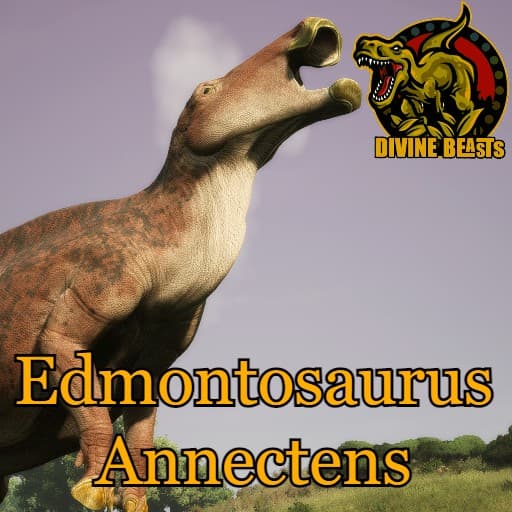
Divine Beasts: Edmontosaurus Annectens
by AlderonGamesMods(830-239-479)
Description
Divine Beasts is a Sciencefiction based mod, we don't claim realism and will take creative liberties where we see fit both in gameplay and design!
Edmontosaurus is a duck billed dinosaur which lived approximately 66 to 74 million years ago during the Cretaceous Period. It was first discovered in 1871 in Alberta, Canada
Made by: Matheusfers/Laika
Special thanks:
SadEch/Scorching_Kami/EmilyArt
/MiahAG/Fledged Feathers
How to install on a Path of Titans community server
Three steps. Stop the server first - mod changes only apply on startup.
- 1
Find the Mod ID
In Path of Titans, open the Mods page, select the mod, and copy the Mod ID (it looks like
UGC_M_...).For this mod:
UGC_M_Z850QPPE2V_SK(use the Copy button on the right). - 2
Edit your server files
- Log in to your server panel and STOP the server.
- Navigate to the config directory, usually:
/PathOfTitans/Saved/Config/LinuxServer - Open
GameUserSettings.iniand find or create the header:
[PathOfTitans.Mods]
EnabledMods=UGC_M_Z850QPPE2V_SK
#Divine Beasts: Edmontosaurus Annectens
Add a new
EnabledMods=ModIDline for each mod you want enabled. The#line is an optional comment - useful for keeping the file readable when you have many mods.Save the file and restart your server. The mod downloads on startup.
- 3
Setting up a custom map (if applicable)
If the mod is a custom map, you also need to set the map name in
Game.ini:- Get the map file name from the mod author or the mod files (look for a
.umap). - Open
Game.iniand add under the[/Script/PathOfTitans.IGameSession]header:
[/Script/PathOfTitans.IGameSession]
ServerMap=MapFileName
Save the file and start your server.
- Get the map file name from the mod author or the mod files (look for a
Patch history(8 entries)
Latest Updated to latest game version.
Fixed starvation and dehydration damage from a flat 0.1 to a flat 0.2
Fixed suffocation damage from a flat 3 to a flat 6
Fixed baby-stage food/hunger/thirst capacity: Body Food Amount from 250 to 50, Max Hunger from 250 to 80, Max Thirst from 100 to 60 (with the rest of the growth curve scaled down accordingly)
Fixed bleed resistance while resting from 0.75 to 1.0, and while sleeping from 0.5 to 1.0
Fixed Headbutt stamina cost from 0 to 5/5/5/5/6 (by growth stage)
Fixed Left Kick stamina cost from 0 to 4/5/6/7/8
Fixed Right Kick stamina cost from 0 to 5/6/7/8/9
Fixed Front Kick stamina cost from 0 to 3/4/5/6/7
Fixed Stomp V2 bone-break chance from a flat 1.0 (100%) to a flat 0
Fixed the Juggernaut passive damage buff from 1.15 to 1.05Fixed Kick attack not working like intended.
Updated to latest game version.
- Fixes the stomp location, now the AOE properly starts from the front hooves!
- Reduced Health from 1200 to 1000
- Reduced Combatweight from 7000 to 6500
- Reduced overall turn rotation and radius by -25%
- Increased swim cost by 25%
- Added 3 passives: Planted Feet: Negates all knockback while bipedal. Dreadnought: Increases durability by 20% when moving fast, but decreases it by 5% when moving walking or standing still Ironclad: Vanilla equivalent, 10% armor
- Bite cooldown increased from 1.3 to 1.6
- Bite damage reduced from 35 to 30
- Headbutt damage reduced from 80 to 60
- Headbutt cooldown increased from 3 to 4
- Annectens now takes 35% more damage while diving underwater.
- Front Kick damage reduced from 75 to 65
- Front Kick cooldown increased from 3.5 to 4
- Heavy Keratin increased incoming damage reduced from 10 to 5%
- Family Chorus added as a new sense, works the same way as other Hadrosaurs in-game except Annectens must be grouped first and won't get stamina recovery buff when ungrouped.
- Running Amok added as a new sense, when below 20% health your attacks cooldowns and turn radius 25% and increases trample damage.
- Added Rugged Hide which increases status effect recovery by 20%
- Added Thick Scutes which increases health regeneration by 20%
- Added Second Wind, same as vanilla but weaker by -25% and its duration is 6 seconds instead of 8
- Braced Legs added to Back Limb slot
- Strong Legs added to Back Limb slot
- Blitz added to back limb slot, all attacks done from bipedal stance deal 10% more damage.
- Pivot added, Annectens gains increases turn speed while bipedal by 15% (Half of Iguanodon's Pivot at 30%)
- Reduced broadcast distant call volume by -20%
Updated for latest game version.
Fixed: Earthshaker description.