
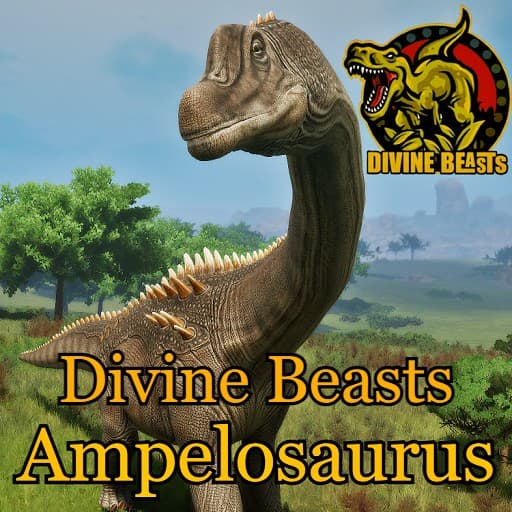
Divine Beasts: Ampelosaurus
by AlderonGamesMods(830-239-479)
Description
Divine Beasts is a Sciencefiction based mod, we don't claim realism and will take creative liberties where we see fit both in gameplay and design!
Ampelosaurus is currently one of the best known sauropods from Europe and is in fact another example of a Late Cretaceous era titanosaur.
Made by: SadEch/Matheusfers/Laika
Special thanks:
/EmilyArt/MiahAG/Scorching_Kami/Fledged_Feathers
How to install on a Path of Titans community server
Three steps. Stop the server first - mod changes only apply on startup.
- 1
Find the Mod ID
In Path of Titans, open the Mods page, select the mod, and copy the Mod ID (it looks like
UGC_M_...).For this mod:
UGC_M_K5GEZ410PN_SK(use the Copy button on the right). - 2
Edit your server files
- Log in to your server panel and STOP the server.
- Navigate to the config directory, usually:
/PathOfTitans/Saved/Config/LinuxServer - Open
GameUserSettings.iniand find or create the header:
[PathOfTitans.Mods]
EnabledMods=UGC_M_K5GEZ410PN_SK
#Divine Beasts: Ampelosaurus
Add a new
EnabledMods=ModIDline for each mod you want enabled. The#line is an optional comment - useful for keeping the file readable when you have many mods.Save the file and restart your server. The mod downloads on startup.
- 3
Setting up a custom map (if applicable)
If the mod is a custom map, you also need to set the map name in
Game.ini:- Get the map file name from the mod author or the mod files (look for a
.umap). - Open
Game.iniand add under the[/Script/PathOfTitans.IGameSession]header:
[/Script/PathOfTitans.IGameSession]
ServerMap=MapFileName
Save the file and start your server.
- Get the map file name from the mod author or the mod files (look for a
Patch history(5 entries)
Latest Updated to latest game version.
Rebalanced core stats (health, weight, hunger/thirst, oxygen, recovery rates, fall tolerance, turning) to be in line with vanilla playables
Fixed Armor from 1.2 to 1.1
Fixed a data-entry typo in bleed heal rate at adult growth stage (was reading 0.23 instead of 0.032)
Fixed bleed resistance while resting from 0.75 to 1.0, and while sleeping from 0.5 to 1.0
Fixed meat decay rate at adult growth stage from 1.67 to 1.0
Fixed Bite cooldown from 1.0s to 1.5s
Fixed Sprint stamina cost from 0.4/0.64/1.1/1.5/2.5 to 1.1/0.65/0.8/1/2.2
Fixed Swim stamina cost from a flat 1.05 to 0.4/0.5/0.6/0.7/0.8
Fixed Fast Swim stamina cost from a flat 2.1 to 0.8/0.95/1.1/1.35/1.5
Fixed Dive stamina cost from a flat 1.05 to 1.6/1.9/2.2/2.7/3
Fixed Fast Dive stamina cost from a flat 2.1 to 0.8/1/1.2/1.4/1.6
Fixed Jump stamina cost from 1/1/1/1/5 to a flat 5
Fixed Left Tail Attack damage from 22/25/35/45/55 to a flat 20
Fixed Right Tail Attack damage from 22/25/35/45/55 to a flat 20
Fixed Tail Attack AOE damage from 45/45/50/60/80 to a flat 20
Fixed Tail Attack AOE cooldown from 4s to 8s
Fixed Tail Attack AOE radius from a flat 550 to 200/200/350/375/425
Fixed main Stomp damage from a flat 120 to 40/50/55/60/70
Fixed main Stomp stamina cost from 5 to 10
Fixed main Stomp radius from 250/300/400/500/550 to 80/150/250/400/500
Fixed the four limb-stomp attacks (FL/FR/BL/BR) damage from 10/20/30/40/60 to 5/10/15/20/30 each
Fixed the four limb-stomp attacks (FL/FR/BL/BR) stamina cost from 0 to 3 each
Fixed both Kick attacks damage from 20/30/40/50/75 to 10/15/20/25/35 each
Fixed both Kick attacks stamina cost from 0 to 3 each
Fixed Bulwark incoming damage reduction from 0.6 to 0.7Updated to latest game version.
Updated for latest game version.
Updated to latest game version.