
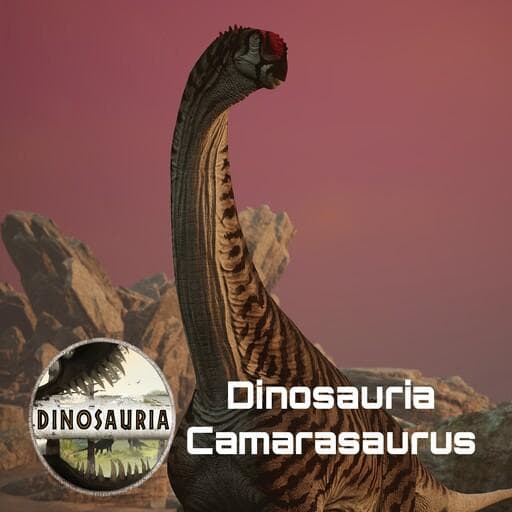
Dinosauria Camarasaurus
by pnoodle5(390-152-667)
Description
Camarasaurus:
A 5 slot sauropod hailing from the Morrison formation of North America! This herbivore generalist uses a mix of bipedal and quadrupedal stances as well as utility brawling tools to adapt to any situation and pull the edge against strong adversaries!
Creator/Commissioner: Acnologia
Model/Rig: Mr. Troodon
Animation: Teo
Skins: Pi, Pnoodle5, FledgedFeathers, Janey
Sound: Inklyon, Mr. Parasaur
Consultation: Cuttlefish
Concepts: Inklyon, Ink-Mug
Implementation and misc: Pnoodle5
Special Thanks to: the Dinosauria Tester Team
How to install on a Path of Titans community server
Three steps. Stop the server first - mod changes only apply on startup.
- 1
Find the Mod ID
In Path of Titans, open the Mods page, select the mod, and copy the Mod ID (it looks like
UGC_M_...).For this mod:
UGC_M_DYV7X54EGX_SK(use the Copy button on the right). - 2
Edit your server files
- Log in to your server panel and STOP the server.
- Navigate to the config directory, usually:
/PathOfTitans/Saved/Config/LinuxServer - Open
GameUserSettings.iniand find or create the header:
[PathOfTitans.Mods]
EnabledMods=UGC_M_DYV7X54EGX_SK
#Dinosauria Camarasaurus
Add a new
EnabledMods=ModIDline for each mod you want enabled. The#line is an optional comment - useful for keeping the file readable when you have many mods.Save the file and restart your server. The mod downloads on startup.
- 3
Setting up a custom map (if applicable)
If the mod is a custom map, you also need to set the map name in
Game.ini:- Get the map file name from the mod author or the mod files (look for a
.umap). - Open
Game.iniand add under the[/Script/PathOfTitans.IGameSession]header:
[/Script/PathOfTitans.IGameSession]
ServerMap=MapFileName
Save the file and start your server.
- Get the map file name from the mod author or the mod files (look for a
Patch history(6 entries)
Latest BUGS
Fixed major physics issues with interaction when near other camas.
Fixed major physics issues with V1 AOE abilities striking from enormous range
Cama was mistakenly listed as a 4 slot. He has always been balanced as a 5 slot and now shows as a 5 slot.
Fixed mud bath emote being able to be abused and hide animations entirely
Fixed baby Cama being way too loud from way too far
BALANCE
Cama can now bite while reared
QOL/MISC
New wound textures
New Tree Eating emote animation to roleplay eating from trees. It might also be used to fake out your opponents...
Players can now walk underneath the sauropods. Thanks to Nautilus for help!Updated to latest game version.
BUGS
Fixed eyes not closing while sleeping
Fixed breathing not applying properly
Fixed baby morph not applying properly
Pounce Hitbox fixes
Fixed sturdy failing to apply
Attempted fix for calls getting cut off
Adjusted animation blending to be smoother
Many more not listed hereBALANCE
Increased sprint speed multiplier: 1,1,1,1,1 -> 1.2,1.2,1.2,1.2,1.2
Reduced bipedal stamina drain: 7,7,7,7,7 -> 3,3,3,3,3
Reduced bipedal walking stamina drain: 10,10,10,10,10 -> 5,5,5,5,5
Reduced light stomp cost: 8,8,8,8,8 -> 0,0,0,0,0
Increased windup speed of light stomp
Reduced light stomp falloff: ,1,0.8,0.6,0.3,0 -> 1,0.8,0.7,0.6,0.5
Increased light stomp radius: 300,300,300,300,300 -> 400,400,400,400,400
Reduced body bash cost: 10,10,10,10,10 -> 0,0,0,0,0
Reduced body bash knockback but reoriented it downward: 12,12,12,12,12 -> 6,6,6,6,6
Sped up body bash animation and improved hitbox
Body bash usable while walking, trotting, and sprinting.
Reduced falloff of walking stomp damage: 1,0.8,0.6,0.3,0 -> 1,0.8,0.7,0.6,0.5
Reduced the length of the exit animation after the walking stomp.
Made a small delay betweeen starting to stand and being able to use the walking stomp.
Bite damage increased: 30,30,30,30,30 -> 50,50,50,50,50
Bite animation sped up
Bite hitboxes and damage window improved
Front and rear kicks have improved reach, aim, and hitboxes
Front and rear kicks usable while walking, trotting, and sprinting
Big stomp height change: 250,250,250,250,250 -> 550,550,550,550,550QOL/MISC
Added new sounds to mudbath
Gave jump to hatchling so players can clear the homecave quest. It is not recommended to modify the jump force from current values.
Broadcast and Threaten now work as distance calls beyond render range
Removed unneccesary files in the backend
Slight adjustment to textures
Two new lovely skins by the amazing Janey!Updated for latest game version.
BUGFIXES
Attempted fix for 1-call cutoff
Changed description for charge stomp to reflect how it currently functions
Changed CW as it was too high in error: 6250 -> 6000
Fixed armor value with ironclad as it was below 1 in error: 1 -> 1.1
Fixed lookout emote being eatingMISC/QOL
Reduced frequency of idle noises
Allowed cancelling for every emote call
Adjusted MudBath emote. If you walk during it you will now pop out of the emote.
Improved textures (Thanks to Feilong!)Release