
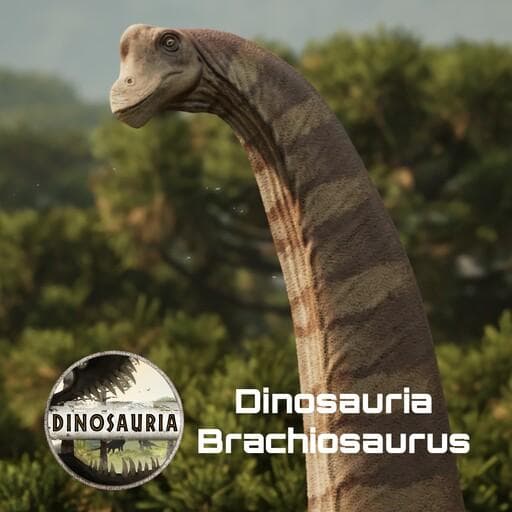
Dinosauria Brachiosaurus
by pnoodle5(390-152-667)
Description
Creator/Commissioner: Acnologia
Model/Rig: Mr. Troodon
Animation: Rospaw
Skins: Rospaw, Pi, Pnoodle5, Clay, Maxsentia, Janey
Sound: Inklyon, Mr. Parasaur
Consultation: Cuttlefish
Concepts: Inklyon
Implementation and misc: Pnoodle5
Special Thanks To: the Dinosauria Tester Team, Feilong, GatorBoots
Brachiosaurus altithorax:
One of the tallest known sauropods from the Late Jurassic of the Morrison Formation! This brawling 6 slot heavyweight uses large stomps that inflict facture while taking a vocal support route for any allies that wisely group with this majestic creature.
How to install on a Path of Titans community server
Three steps. Stop the server first - mod changes only apply on startup.
- 1
Find the Mod ID
In Path of Titans, open the Mods page, select the mod, and copy the Mod ID (it looks like
UGC_M_...).For this mod:
UGC_M_4RMEKV37ZY_SK(use the Copy button on the right). - 2
Edit your server files
- Log in to your server panel and STOP the server.
- Navigate to the config directory, usually:
/PathOfTitans/Saved/Config/LinuxServer - Open
GameUserSettings.iniand find or create the header:
[PathOfTitans.Mods]
EnabledMods=UGC_M_4RMEKV37ZY_SK
#Dinosauria Brachiosaurus
Add a new
EnabledMods=ModIDline for each mod you want enabled. The#line is an optional comment - useful for keeping the file readable when you have many mods.Save the file and restart your server. The mod downloads on startup.
- 3
Setting up a custom map (if applicable)
If the mod is a custom map, you also need to set the map name in
Game.ini:- Get the map file name from the mod author or the mod files (look for a
.umap). - Open
Game.iniand add under the[/Script/PathOfTitans.IGameSession]header:
[/Script/PathOfTitans.IGameSession]
ServerMap=MapFileName
Save the file and start your server.
- Get the map file name from the mod author or the mod files (look for a
Patch history(7 entries)
Latest BUGS
Solo heal call now works solo and out of combat
BALANCE
Heavy stomp now locks you in place, but can be released extremely early. This prevents abuse with hiding the animation while precise moving, but still allows players to cancel the ability and change actions.
QOL/MISC
Minor texture improvements
New skin by Janey: SandStorm!
Players can now walk underneath the sauropods. Thanks to Nautilus for help!Updated to latest game version.
DinosauriaBrachi
BUGS
Fixed a bug when using lookaround while sitting
Light stomp animation feet animation improved
Fixed sturdy failing to apply
Attempted fix for calls getting cut off
Adjusted animation blending to be smoother
Many more not listed hereBALANCE
Reduced sprint cost per second: 1.1,0.65,0.8,1.4,2 -> 1.1,0.65,0.8,1,1.2
Front and Rear kicks bone break chance increase: 0.2,0.2,0.2,0.2,0.2 -> 1,1,1,1,1
Front and Rear kicks fracture amount increase: 2,4,6,8,15 -> 5,10,20,30,50
Max health increase: 300,500,700,970,1250 -> 300,500,700,1000,1375
Modified charge stomp to have an increased speed
Modified light stomp to have an increased speed
Added a second damage for the heavy stomp if it makes direct combat
Tail slap cooldown increased: 4,4,4,4,4 -> 9,9,9,9,9
Tail slap damage increased: 20,20,20,20,20 -> 25,25,25,25,25
Tail slap added: 3 secondsof Daze
Tail Strike cooldown increased: 6,6,6,6,6 -> 9,9,9,9,9
Tail strike damage increased: 20,25,30,45,50 -> 20,20,35,50,60
Rear kick cooldown increased: 3,3,3,3,3 -> 4,4,4,4,4
Light stomp slightly slower a tiny bit
Light stomp reduced damage falloff with AOE: 1,0.8,0.6,0.3,0 -> 1,0.8,0.7,0.6,0.5
Charge stomp minium charge increased: 0.5 seconds -> 1 second
Charge stomp AOE damage increase: 50,80,120,160,220 -> 80,120,160,220,300
Charge stomp AOE falloff reduced: 1,0.8,0.6,0.3,0 -> 1,0.8,0.7,0.6,0,5MISC/QOL
Fixed nest and hatching issues
Wound texture cleanup
Shininess fixes on skin
General hitbox adjustmentsBUGS
Fixed erroneous text regarding Bracing Song again
Fixed minor typo in Healing Aura text
Changed charged stomp to work more like Diplodocus'. In practice, this means releasing stomp early no longer makes it do nothing. This is not the final iteration of this fix
Now spawns in Hatchling/Juvie with the tail attack slotted.MISC/QOL
Gave jump to hatchling so players can clear the homecave quest. It is not recommended to modify the jump force from current values.
Broadcast, Threaten, and Sing now work as distance calls beyond render range
Slight adjustment to textures
Adjusted camera range for character edit window
General texture adjustments
New skin: Clay, by... Clay!
New emote: Camera Change Toggle! Use this emote to change your zoomed-in camera from up by your head to down by your feet. Use it again to change back to normal.
New scar textures
Adjusted animation blendingUpdated for latest game version.
BUGFIXES
Combat weight
6000 -> 7000
These numbers were mistakenly too high, but may be increased later after testing:
Light Stomp: 10,20,40,65,90 -> 10,15,25,40,60
Added missing Toxin and Paralysis multipliers in curves
Fixed health recovery typo that made it extremely high
4,4,4,4,4 -> 2.5,2,1.9,1.8,1.75
changed Bracing Song buff description: it should now say 15% to match the current value
Fixed description of charge stomp to match how it currently functions
Fixed lookout emote being eatingBALANCE CHANGES
Resting and Sleeping incoming damage multipliers
Resting: 1,1,1,1,1 -> 2,2,2,2,2
Sleeping: 1,1,1,1,1 -> 4,4,4,4,4
Slightly increased fall damage resistance
3000,2000,2000,1500,1500 -> 3000,2000,2000,1750,1750
Changed charge stomp early release windowMISC/QOL
Footstep volume and intensity increased
Charge stomp and light stomp volume reduced
Added idle breathing sounds
Adjusted look around emote. If you walk during it you will now pop out of the emote.
Improved textures (Thanks to Feilong!)updates