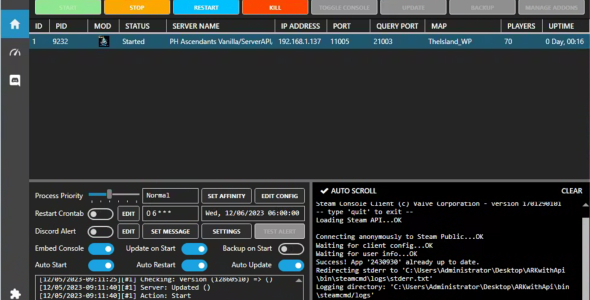
ARK:SA™ with ServerAPI Server manager plugin for WindowsGSM

ARK:SA™ with ServerAPI Server manager plugin for WindowsGSM 2.9.3

No permission to download

Welcome!

By registering with us, you'll be able to discuss, share and private message with other members of our community.

SignUp Now!
  • Public Service Announcement

    Hey Guest, I’ve got some exciting news to share! 🎉

    Starting this December, I’ll be moving the entire GameServersHub website away from WordPress and rebuilding it in Next.js! This upgrade will bring incredibly faster speeds, smoother performance, and a modern user experience that sets the stage for everything coming next.

    In 2026, GameServersHub will be entering a new era. I’ll be revamping the entire platform from the ground up and launching a brand-new, fully modernized marketplace. It’ll feature a cleaner design, improved functionality, and better tools for both creators and server owners.

    On top of that, development has already started on the GameServerListing project at https://gsl-six.vercel.app/, which is expected to launch in early Q1 2026. This new system will make discovering and managing servers easier than ever before.


    👉 Stay in the loop!
    Join our Discord for behind-the-scenes updates, early previews, and community discussions.

    » Click here to join our Discord! «

    ~ MrOwlSky

Marco Oasan

Well-known member
Joined
Dec 12, 2022
Messages
40
Marco Oasan submitted a new resource:

ARK:SA™ with ServerAPI Server manager plugin for WindowsGSM - WindowsGSM plugin that provides Ark Survival Ascended Dedicated server with ServerAPI support

WindowsGSM.ArkSAwithServerAPI​

🧩WindowsGSM plugin that provides Ark Survival Ascended Dedicated server with ServerAPI support from GameServerHUB

WindowsGSM Installation:​

  1. Download WindowsGSM https://windowsgsm.com/
  2. Create a Folder at a Location you wan't all Server to be Installed and Run.
  3. Drag WindowsGSM.Exe into previoulsy created folder and execute it.

Plugin Installation:​

  1. ...

Read more about this resource...
 
When trying to import the plugin, it even imports, a directory with some files appears inside the windowsgsm plugin folder, but Ark ASCENDED does not appear in the list of servers, even when clicking reload or restarting the application.
 
make sure you are pasting the plugins inside <WGSM FOLDER>\servers\1\serverfiles\ShooterGame\Binaries\Win64\ArkApi\Plugins
to check if there is something wrong try to Click "Toggle Console" and the ArkApiLoader Console will appear
 
make sure you are pasting the plugins inside <WGSM FOLDER>\servers\1\serverfiles\ShooterGame\Binaries\Win64\ArkApi\Plugins
to check if there is something wrong try to Click "Toggle Console" and the ArkApiLoader Console will appear
I wasn't as specific as I wanted, the plugin that I couldn't import was the WindowsGSM plugin, after importing and unzipping it into the WindowsGSM plugin folder, I go to install server and Ark Survival Ascended doesn't appear in the list of servers. I've already clicked on Reload Plugin and restarted WindowsGSM and still Ascended doesn't appear in the list of servers.
 
I wasn't as specific as I wanted, the plugin that I couldn't import was the WindowsGSM plugin, after importing and unzipping it into the WindowsGSM plugin folder, I go to install server and Ark Survival Ascended doesn't appear in the list of servers. I've already clicked on Reload Plugin and restarted WindowsGSM and still Ascended doesn't appear in the list of servers.
try the manual installation then

Extract the zip then the folder .cs paste it to plugins folder then reload
 
Its able to load plugins aka the api but not the command line augments or mods with the plugins. I don't really see any option to enabled api plugins like other launcher mangers
 
Its able to load plugins aka the api but not the command line augments or mods with the plugins. I don't really see any option to enabled api plugins like other launcher mangers
Theres a start parameters field that you can put mods. please read docs of wgsm
 
Back
Top


